Document guide · October 2026
Remove metadata from an Excel file
The budget, price list or report you’re about to send still names its author, the last person who saved it, your company and manager, everyone who left a comment, and where the pictures in it were taken. Here’s how to remove metadata from an Excel file, on Windows and Mac, and how to make sure nothing is left behind.
Free for 3 days · then $5 once · no subscription · Buy a licence
 Q4 Campaign Budget.xlsx6 findings
- AuthorJordan MillerFoundRemoved
- Last saved byTaylor BrooksFoundRemoved
- CompanyNorthwind StudioFoundRemoved
- ManagerAlex MorganFoundRemoved
- Comments2 notes with namesFoundRemoved
- Photo location39.0968° N, 120.0324° WFoundRemoved
- Sheets and formulasBudget · unchangedFoundKept
- Charts and imagesCopied as they wereFoundKept
Short answer
Excel metadata is the hidden information saved with a workbook: author, last saved by, company, manager, dates, cell comments and the EXIF data of the pictures inside. Three ways to remove it:
- Windows: File › Info › Check for Issues › Inspect Document › Inspect › Remove All for Document Properties and Personal Information.
- Mac: Excel › Settings › Security › tick Remove personal information from this file on save.
- Everything, pictures included: open the XLSX in MetaClean and save a verified clean copy; your original stays as it was.
Get MetaClean freeFree for 3 days · then $5 once · no subscription
What metadata an Excel file reveals
Excel writes these details into every XLSX automatically, and anyone you send it to can read them under File › Info, or in Properties on Windows and Get Info on a Mac:
- Author and last saved bySensitiveYour name, and the name of the last person who saved it.
- Company and managerSensitiveFilled in from your Office account or your organisation’s template.
- Cell comments and notesSensitiveEvery comment keeps the name of the person who wrote it.
- DatesRevealingCreated, modified and last printed, to the second.
- Hidden sheets, rows, linksRevealingHidden working, and paths to other workbooks on your drive.
- Title, subject, keywordsRevealingOften left over from a template or an earlier client.
- Pictures and logos insideSensitiveEach image keeps its EXIF: GPS location, camera, serial number.
You sent a price list.It named your marginin a comment.
Comments, notes and hidden rows travel with the workbook long after you stop seeing them.How to use Excel’s Document Inspector
Excel has a
Excel for Windows
- Save a copy of the workbook first.
- Go to File › Info › Check for Issues › Inspect Document.
- Click Inspect, then Remove All next to Document Properties and Personal Information, and next to Comments and Notes if you want them gone.
- Close the inspector and save.
Excel for Mac
- Open the workbook in Excel.
- Go to Excel › Settings › Security.
- Under Privacy, tick Remove personal information from this file on save.
- Close the window and save.
What the inspector checks in each app, what to do on a Mac and why it can be greyed out: see the Document Inspector guide.
Source: Microsoft, Remove hidden data and personal information by inspecting documents, presentations, or workbooks.
What Excel’s own tools leave behind
The Document Inspector and the Mac privacy option clean the workbook’s own properties. Three things still go out with the file:
Pictures inside
Every inserted photo or logo keeps its GPS location, camera model and serial number.
Your original
The inspector cleans the workbook you have open, so the copy with your details is gone unless you saved one first.
No proof
Nothing confirms afterwards that every field is really empty, file by file.
That’s the gap MetaClean fills: it removes the workbook’s metadata and the picture metadata inside it, from a copy, and checks the result.
How to remove all metadata from an Excel file
- 1
Open the workbook in MetaClean
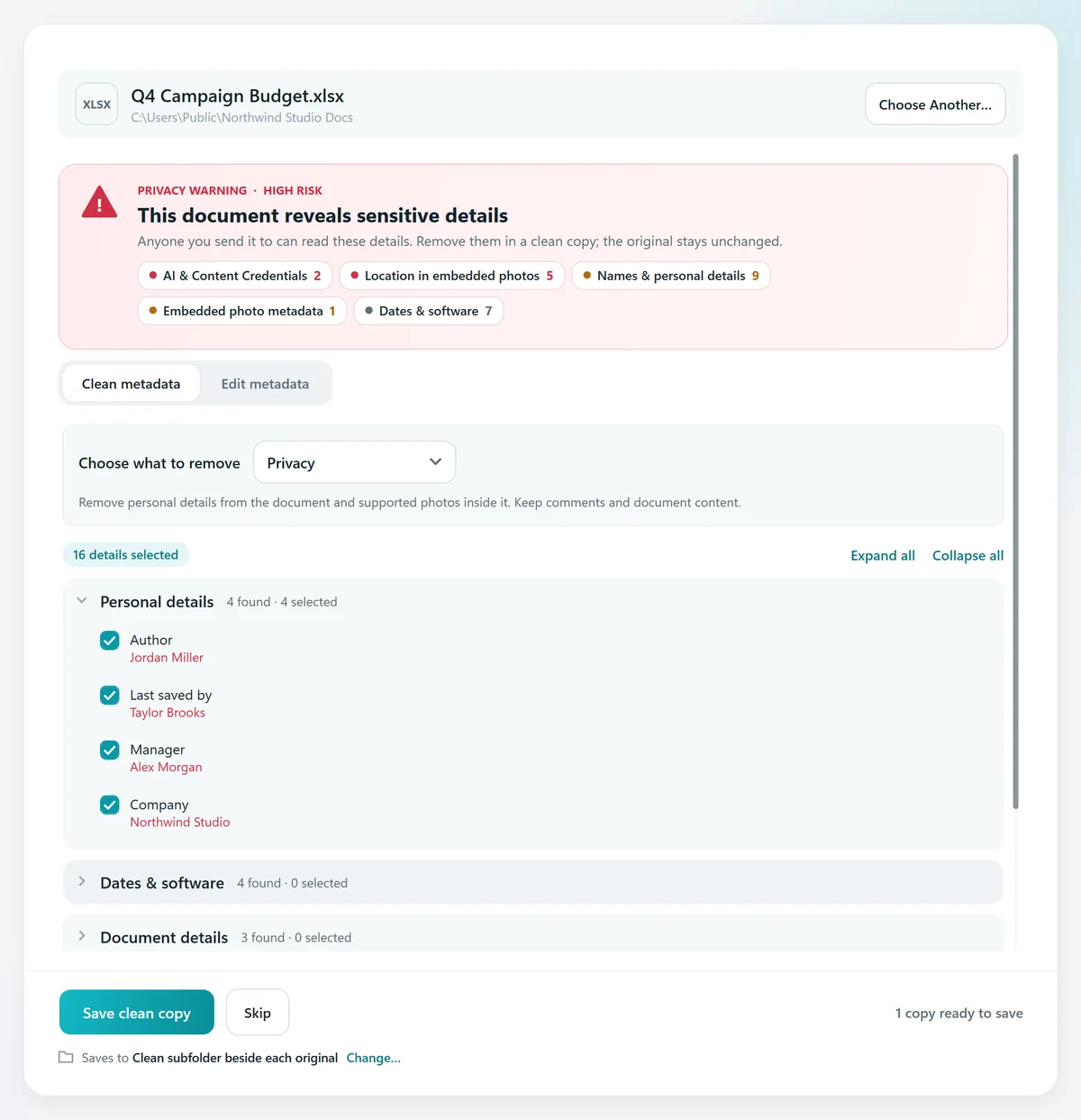
Choose Documents › Single document and pick your XLSX or XLS file. It’s read on your computer; nothing is uploaded.
- 2
See what it reveals
A privacy warning lists the author, last saved by, company, manager and every other field, plus the details hidden in the pictures inside. Hidden sheets, rows and links to other workbooks are pointed out too, so you can check them before you send.
- 3
Choose what to remove
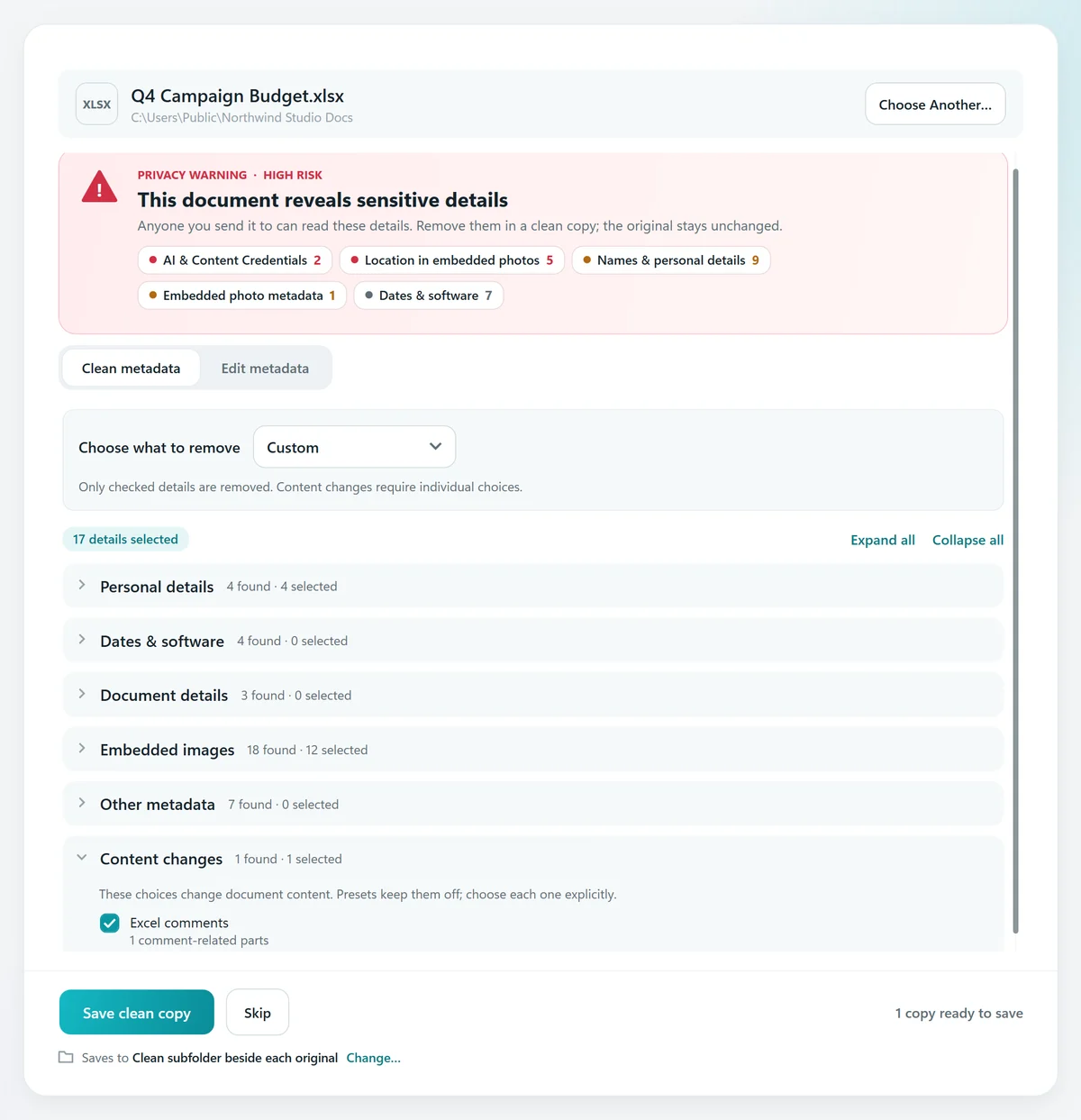
The Privacy preset selects names, company and picture location and camera details. Tick Excel comments under Content changes to remove comments too.
- 4
Save the clean copy
MetaClean checks that every selected field is gone and the cells are unchanged, then saves the copy in a “Clean” folder beside the original.


Excel’s inspector, online tools and MetaClean, compared
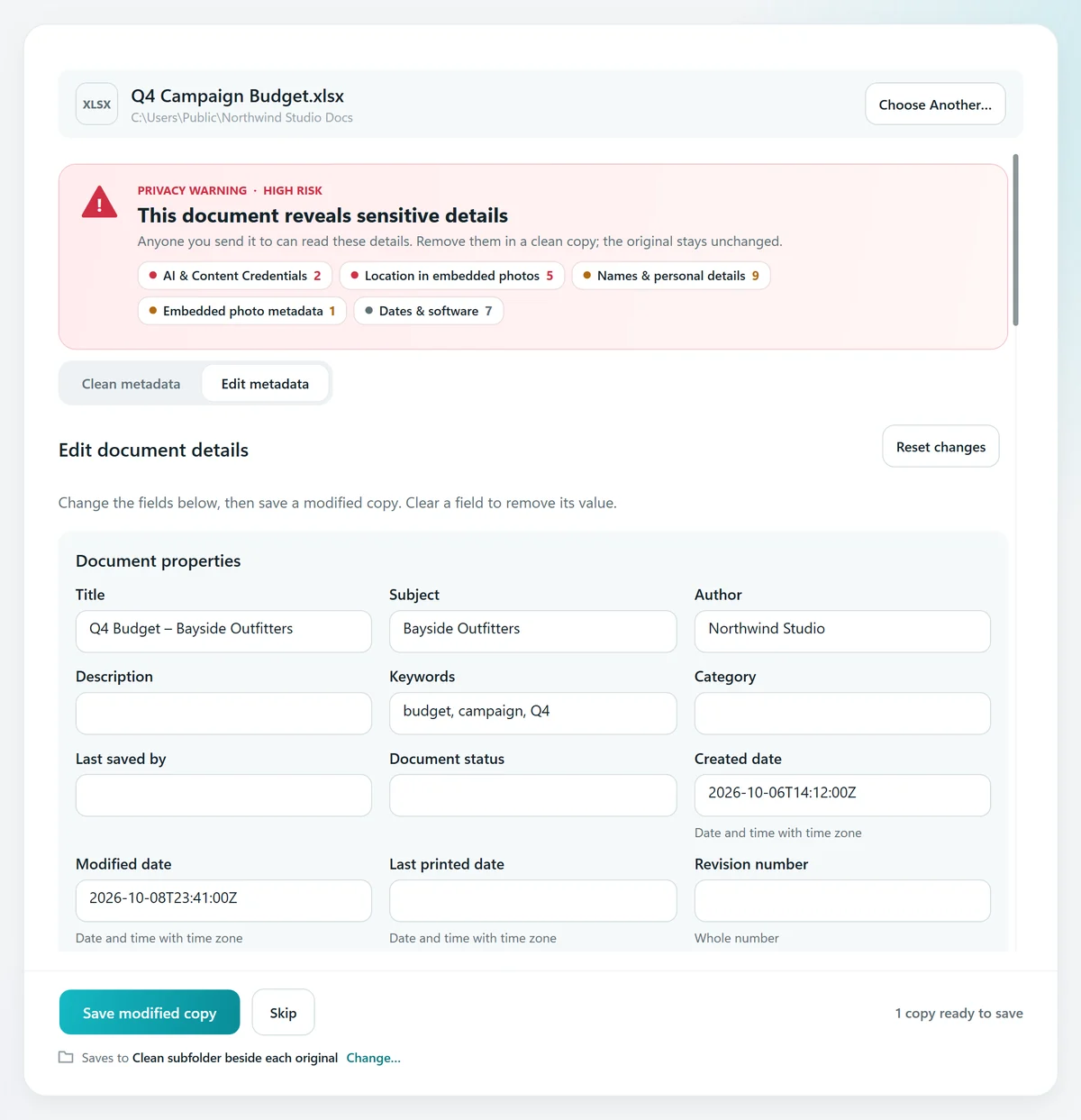
Change the author in Excel instead of removing it
Sending a workbook under your company’s name rather than yours? In Excel for Windows, go to File › Info,
Word, PowerPoint and PDFs work the same way
Documents and presentations carry the same author, company and date fields, and the photos in them keep their location just like the ones in a workbook. MetaClean cleans Word documents, PowerPoint presentations, PDFs and OpenDocument files the same way. Drop a whole folder into Batch folder to clean them all at once, or let Watch Folders check every new document you save. For photos on their own, see the photo metadata remover.
Your workbooks stay on your computer
Budgets, payroll and client lists shouldn’t pass through someone else’s server to remove a name. MetaClean works on your own Mac or Windows PC: no uploads, no account, no file size limits. More about privacy →
People are asking
What your Excel file gives away
Excel metadata: your questions
How do I remove metadata from an Excel file?
In Excel for Windows, go to File › Info › Check for Issues › Inspect Document, click Inspect, then Remove All next to Document Properties and Personal Information, and save. On a Mac, open Excel › Settings › Security and tick “Remove personal information from this file on save”. To also remove the metadata inside photos and logos in the workbook, and get a checked copy, open the XLSX in MetaClean and save a clean copy.
Where is the Document Inspector in Excel?
In Excel for Windows: File › Info › Check for Issues › Inspect Document. Tick the content to check, click Inspect, then Remove All next to each result you want gone. Save a copy first: the inspector changes the workbook you have open and its removals can’t be undone.
What metadata does an Excel file contain?
The author, last saved by, company and manager, title, subject and keywords, created, modified and last printed dates, cell comments and notes with their authors’ names, hidden sheets, rows and columns, links to other workbooks, and the EXIF data of every picture you inserted, including GPS location and camera serial number.
How do I change the author in Excel?
In Excel for Windows, go to File › Info,
Does removing metadata change my numbers or formulas?
No. MetaClean edits only the metadata fields you choose and copies every sheet, cell, formula and chart unchanged, then reads the copy back to confirm it. Removing cell comments is a separate choice you tick yourself.
How do I remove comments from an Excel file?
Excel’s Document Inspector removes Comments and Notes in one step. In MetaClean, open the workbook, expand Content changes and tick Excel comments: the comments and their anchors are removed from the clean copy, and the result lists them as removed.
Does Excel’s Document Inspector remove photo location?
The inspector works on the workbook’s own properties, comments and hidden content. Pictures you insert keep their own EXIF data. MetaClean removes the location, camera and date details from those pictures without recompressing them.
How do I remove metadata from many Excel files at once?
Drop the folder into MetaClean’s Documents › Batch folder: it cleans every XLSX, XLS, DOCX, PPTX, PDF and OpenDocument file inside, subfolders included, and saves verified copies.
Does this work for Word and PowerPoint too?
Yes. Word documents and PowerPoint presentations store the same author, company and date metadata, and MetaClean cleans DOCX, DOC, PPTX and PPT files the same way, plus PDF and OpenDocument ODT, ODS and ODP.

Send the numbers.
Not your details.
Remove or edit Excel, Word, PowerPoint and PDF metadata on your own Mac or PC, with a verified clean copy every time. Free for 3 days, then $5 once.
Download free trial