
All platforms · October 2026
Remove the AI label from any photo or video
Your photo is real, but Instagram says AI info, TikTok says
Free for 3 days · then $5 once · no subscription · Buy a licence
Short answer
Platforms add the AI label when your file carries AI metadata: C2PA Content Credentials or the IPTC “digital source type” AI tag. To remove the AI label, remove that metadata from the file before you upload it:
- Open the photo or video in MetaClean on your Mac or Windows PC. It lists every AI marker it finds.
- Save a clean copy. The AI markers go; the pixels, colours and sound stay exactly as they were.
- Post the clean copy. No AI note in the file, no AI label on the post.
Get MetaClean freeFree for 3 days · then $5 once · no subscription
New · Watch Folders
Stop cleaning by hand. Let MetaClean watch your exports.
Export from any editor.MetaClean checks every file.Only AI metadata interrupts you.
MetaClean runs in the background and watches your export folders, every subfolder included. When a photo or video is exported or copied in, it checks the file. If it carries the metadata that makes Instagram, Facebook, TikTok or YouTube label it as AI, you get a quick prompt: Clean or Skip. If it doesn’t, you never hear a thing.
Works with whatever you export from
- Photoshop
- Premiere Pro
- CapCut
- Any other editor

Photoshop and Premiere Pro are trademarks of Adobe. CapCut is a trademark of Bytedance. MetaClean works with the files they export and is not affiliated with Adobe or Bytedance.
Check a photo or video for the AI label
Drop your file here to see whether it carries the metadata that triggers the AI label: C2PA Content Credentials or an IPTC AI source tag. It’s read by your browser and never leaves your device.
Found AI metadata? Remove it with MetaClean in a few seconds. Want to see every field the file carries? Open it in the free EXIF viewer.
Why real photos and videos get an AI label
No platform looks at your picture and guesses. Instagram, Facebook, TikTok and the rest read the file’s metadata when you upload it, and two fields decide the AI label:
Content Credentials
A signed record of the app and the AI action, such as Generative Fill. Read more in our C2PA remover guide.
Digital source type
One field that says how the image was made. Values like composite mean an AI tool touched it.
Edit history
The app’s log of your edits, which can name the AI feature step by step.
Editing apps now write these fields automatically after any AI feature: Photoshop Generative Fill, Lightroom Generative Remove, Premiere Pro Generative Extend, CapCut AI effects, Google Magic Editor and Samsung Galaxy AI. Remove a stranger from the background, extend a sky, and the whole photo is labelled as AI.
Real photo.One AI
Sources: the C2PA standard, the IPTC digital source type vocabulary and Meta’s approach to labelling AI content.
What the AI label is called on each platform
Every platform names it differently, but they all read the same metadata. That’s why one clean copy removes the AI label everywhere you post it. Pick your platform for the exact steps:
- InstagramAI infoPosts, Stories and Reels →
- FacebookAI infoPosts and Reels →
- ThreadsAI infoSame Meta label as Instagram →
- TikTok
AI-generated Including CapCut exports → - YouTubeMade with AIVideos and Shorts →
- LinkedInCRThe Content Credentials badge →
- PinterestAI modifiedPins and artwork →
Instagram and Facebook first called it Made with AI and renamed it AI info in 2024, so if you’re searching how to remove the “Made with AI” tag, it’s the same label and the same fix.
How to remove the AI label from an image
This is how to remove the AI label from a photo with MetaClean. It takes about ten seconds, and your original file is never changed.
- 1
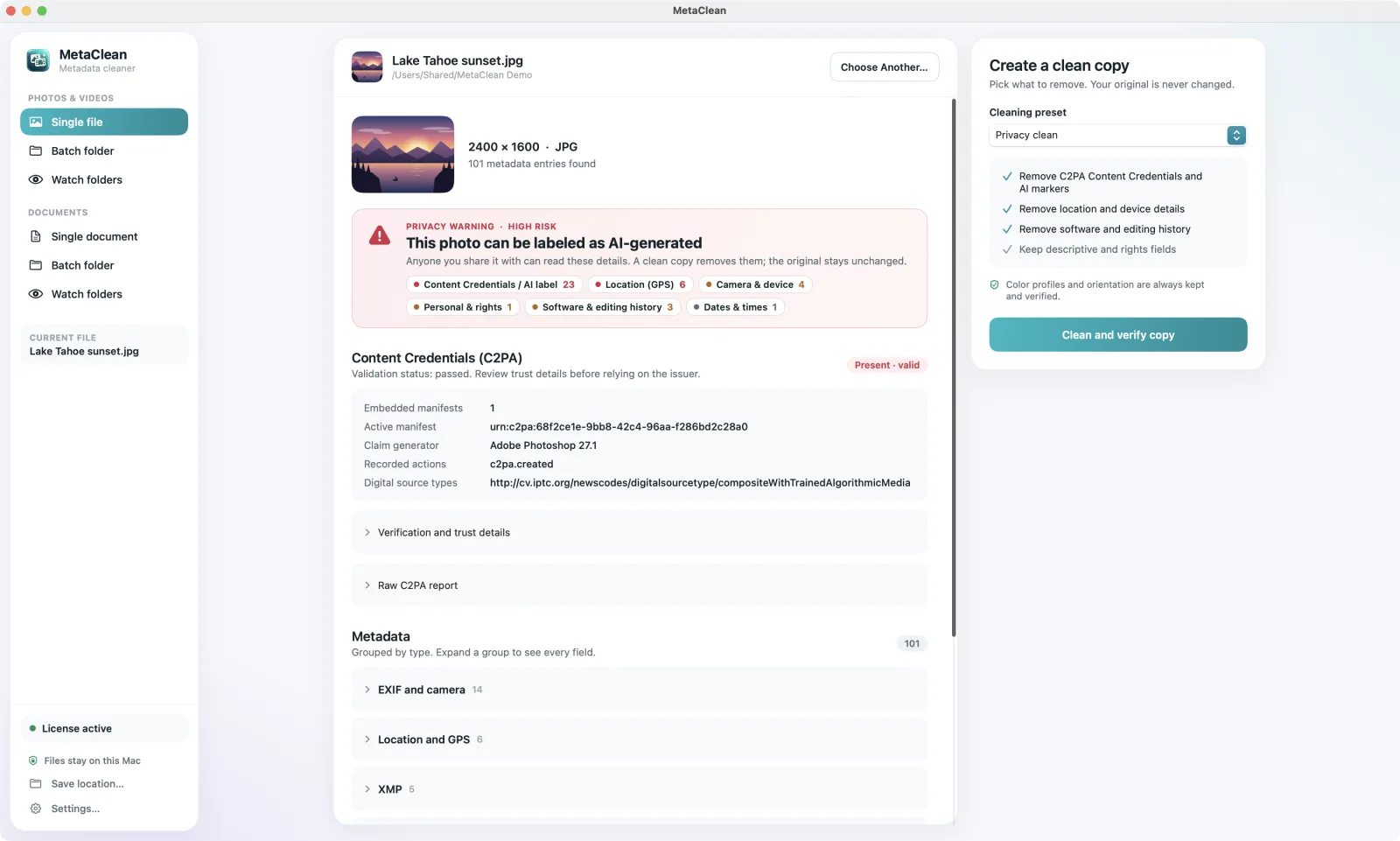
Open the photo in MetaClean
Drag it onto the window on your Mac or Windows PC. Got a whole shoot? Drop the folder instead and MetaClean checks every file inside, subfolders included.
- 2
See exactly why it’s labelled
A privacy warning names every AI marker in plain words, next to the location, camera and software details the photo also gives away.
- 3
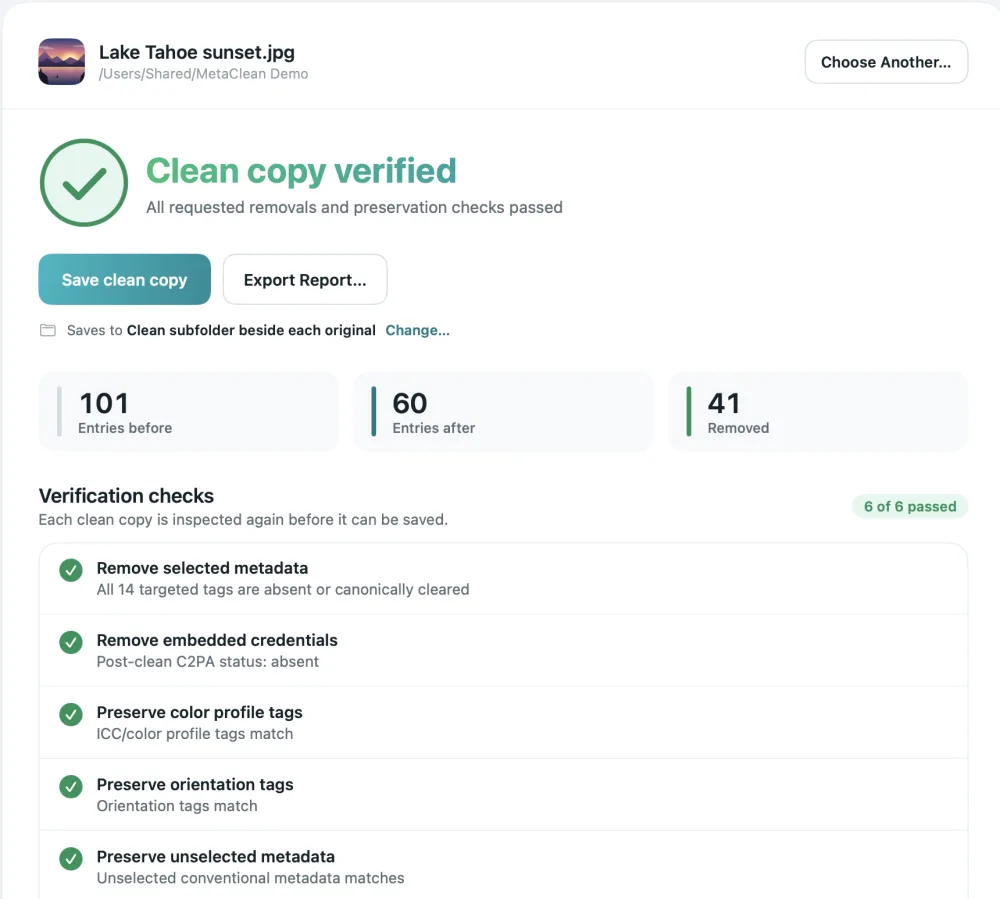
Clean and verify the copy
Credentials only removes just the AI markers. Privacy clean also removes GPS location, camera serial number and timestamps in the same pass.
- 4
Post the clean copy
MetaClean reads the copy back, confirms the AI markers are gone and the picture is unchanged, then saves it to a
Cleanfolder beside your original.
Want to see every field first? Open the file in our free EXIF viewer, or read the full walkthrough on how to remove AI metadata from a photo.
How to remove the AI label from a video
Videos carry the same Content Credentials, written by Premiere Pro, CapCut and phone AI editors. MetaClean removes them from MP4 and MOV files without
Every way to remove the AI label, compared
You’ll find three other suggestions online. Here’s what each one actually does to your file:
Removing one marker isn’t enough: a file with its Content Credentials stripped but the IPTC tag left in place is still labelled. MetaClean removes C2PA, the IPTC AI tag and the AI edit history together, then reads the clean copy back to prove it.
Already posted with the AI label?
Platforms read the metadata when the file is uploaded, so a live post keeps its label. The fix takes two minutes: clean your original with MetaClean, delete the labelled post, and upload the clean copy. Here’s exactly how on Instagram (posts, Stories and Reels), Facebook, TikTok, YouTube and Pinterest.
Posting from your phone? AirDrop or Quick Share the photo to your computer, clean it, and send the clean copy back. Then turn on Watch Folders for your export folder, and the next
Your photos stay on your computer
Online “remove AI label” sites want your file first. MetaClean inspects and cleans on your own Mac or Windows PC: no uploads, no account, no file size limits. More about privacy →
People are asking
Real photo, AI label
Removing the AI label: your questions
How do I remove the AI label from a photo?
Remove the AI metadata from the file before you post it. Open the photo in MetaClean on your Mac or Windows PC and save a clean copy: it takes out the C2PA Content Credentials and the IPTC “digital source type” AI tag, checks the copy, and keeps your original untouched. Post the clean copy and there’s nothing left for the platform to label.
Why does my real photo have an AI label?
Because an app you used wrote an AI note into the file. Photoshop Generative Fill, Lightroom Generative Remove, Google Magic Editor, Samsung Galaxy AI, CapCut AI effects and Premiere Pro Generative Extend all add Content Credentials or an IPTC AI tag, even for a tiny fix. Instagram, Facebook, Threads, TikTok, YouTube, LinkedIn and Pinterest read that note on upload and add their label.
Can I remove the AI label after posting?
The label is applied when the file is uploaded, so the reliable fix is to clean the file and post it again: take your original file, save a MetaClean clean copy, delete the labelled post and upload the clean copy. Our Instagram and Facebook guides walk through it for posts, Stories and Reels.
How do I remove the AI label from a video?
The same way as a photo. MetaClean removes Content Credentials and AI tags from MP4 and MOV files without
What is the “Made with AI” label?
“Made with AI” was Meta’s first name for the label on Instagram and Facebook; it was renamed “AI info” in 2024. YouTube uses “Made with AI” today. Underneath, every one of these labels comes from the same metadata, so one clean copy covers them all.
Is there a free way to check for the AI label?
Yes. The checker on this page reads your photo or video right in your browser and shows whether it carries Content Credentials or an AI source tag. Nothing is uploaded. To remove what it finds, MetaClean is free for 3 days, then $5 once.
Does removing the AI label reduce quality?
No. MetaClean removes metadata, not pixels. Photos are not recompressed and videos are not
Do online AI label removers upload my photo?
Many do: you send the file to a website and download a new one, one image at a time. MetaClean works on your own computer with photos and videos, single files or whole folders, and checks every clean copy before saving it.
Can I stop the AI label before it happens?
Yes. Turn on Watch Folders in MetaClean and add your export folder. Every new photo or video is checked as it lands, and if it carries AI metadata you get a

Real photo in.
No AI label out.
Remove the AI label from photos and videos on your own Mac or PC, with a verified clean copy every time. Free for 3 days, then $5 once.
Download free trial