
Facebook guide · updated 2026
How to remove “AI info” from a Facebook post
A real photo or video, a two-second touch-up, and now Facebook says AI info on it. This guide explains where that tag comes from, how to check which of five causes applies to you, and how to post the same photo again without it, from a computer or from your phone.
The 60-second fix
- Copy your post text, then delete the post that carries the tag.
- Clean the original photo or video with MetaClean on your Mac or Windows PC. It strips the AI note Facebook reads.
- Post the clean copy, from facebook.com or from the app. It goes up without AI info.
What does AI info mean on Facebook?
AI info is Meta’s tag for photos, videos and Reels that it believes were created or changed with artificial intelligence. Tap it and Facebook shows a short note saying the content may have been generated or edited with AI tools. It sits on your post for everyone who sees it: friends, customers, group members and the people who find your Page. It’s what most people mean when they search “AI info Facebook” right after posting a real photo or video.
The tag is not a penalty or a strike on your account. The trouble is how people read it. “AI” next to a family photo, a birthday video, a product shot or a real estate walkthrough makes viewers wonder what’s fake, even when the only change was removing a cable from the sky.
Where the tag shows on a Facebook post
Facebook uses two placements, and knowing which one you have tells you a lot about the cause:
Edited with AI: in the ••• menu
Detected as AI-made: on the post
From “Made with AI” to “AI info”
- Spring 2024Meta starts labelling posts “Made with AI” across Facebook, Instagram and Threads, based on industry-standard metadata in the file.
- Summer 2024Photographers complain that small retouches trigger it. Meta renames the label to “AI info”.
- Autumn 2024For content that was only edited with AI, the tag moves into the post menu. Content detected as AI-generated keeps it on the post.
- TodayThe system still reads the same file metadata. If the note is in your file, the tag comes with it.
Why does it say AI info on my Facebook post?
Facebook doesn’t study your photo or video and decide it looks artificial. It reads signals, and nearly all of them travel with the file. Find your case below:
| What happened | What Facebook saw | The fix |
|---|---|---|
| You edited the photo or video with an AI feature (Generative Fill, Generative Remove, Generative Extend, Magic Eraser, Magic Editor, Galaxy AI) | Content Credentials (C2PA) or an IPTC “AI source” tag written into the exported file | Clean the file with MetaClean, post the clean copy |
| You used an AI upscaler, background remover or filter app | The same kind of note, written by that app | Clean the file, post the clean copy |
| You shared a post from Instagram that already had AI info | The label from Instagram, carried across Meta’s apps | Clean the original file and post it to both apps again |
| You turned on the AI label option when posting | Your own disclosure | Post again with that option off |
| You made the ad with Meta’s generative AI ad tools | The AI feature used inside Ads Manager | Upload your own finished, cleaned creative instead |
Facebook doesn’t look at your photo or video.It reads your file.
That’s why a real photo or clip with one small AI fix can be labelled, and why a clean file isn’t.The first two rows cover most people who search “why does my Facebook post say AI info”. The editing app did nothing wrong: writing Content Credentials is its way of recording that an AI feature was used. The note simply can’t tell a full AI image from a real photo with one cable erased.
Check your file before you post
You don’t have to guess. Drop the photo or video into MetaClean and it lists what the file carries, in plain words: the Content Credentials and the tool they name, the IPTC source type, plus GPS location, camera details and editing history. If you see an AI entry there, that’s your cause.
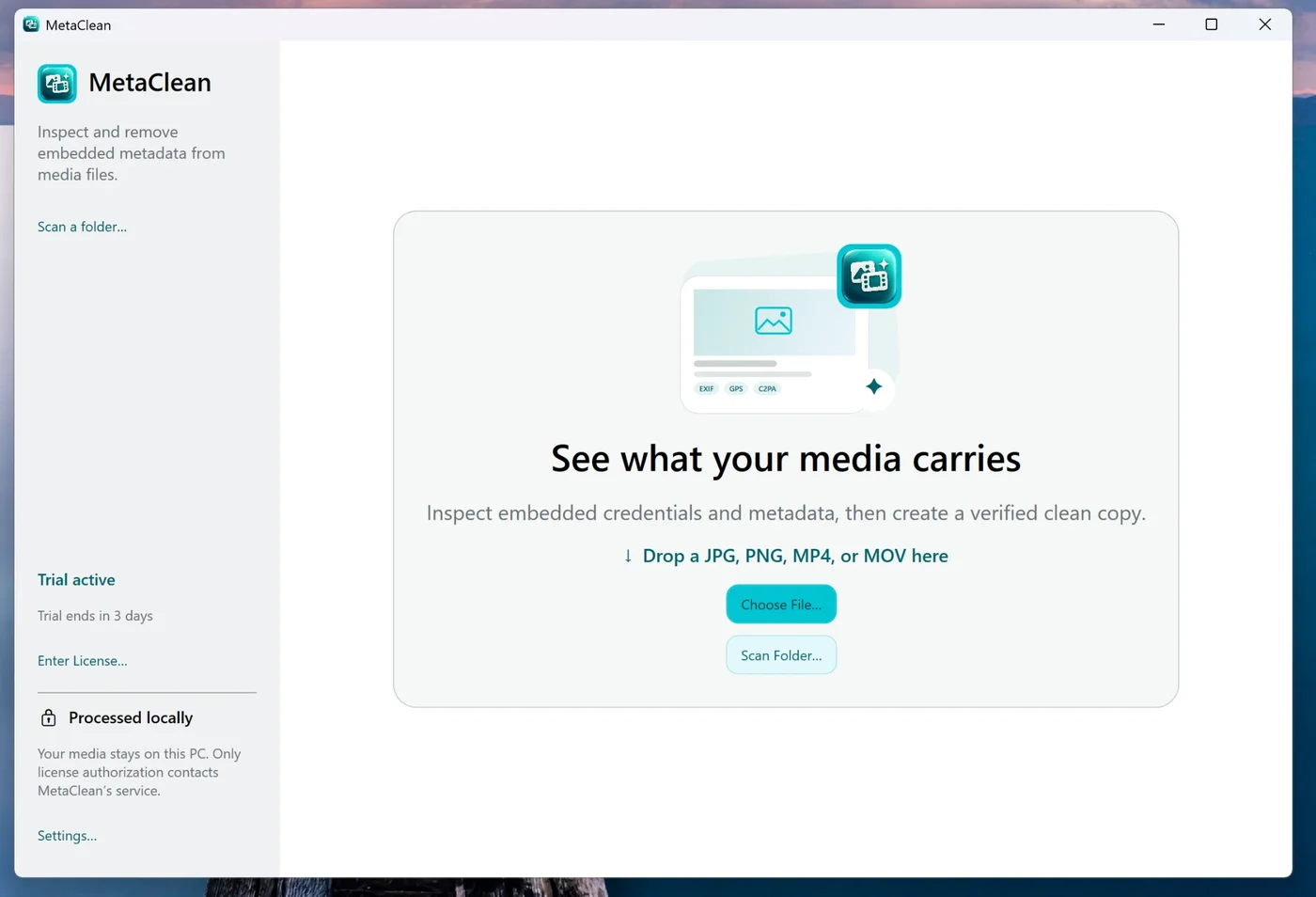
How to remove AI info from a Facebook post on a computer
This is the quickest route, because you clean and post from the same machine. It works the same on a Mac and on a Windows PC.
- 1
Keep your words
Open the post, copy the text, and note who you tagged and the location you added. Then choose ••• → Delete post.
- 2
Find the file you uploaded
Use the exported JPG, PNG, MP4 or MOV, not a copy downloaded back from Facebook. If you edited a batch, point MetaClean at the whole folder.
- 3
Clean it with MetaClean
Pick Credentials only to remove just the AI markers, or Privacy clean to also drop GPS, camera and device details. MetaClean saves a
clean_copy next to your original and leaves the original untouched. - 4
Post the clean copy on facebook.com
Create a new post, add the clean file, paste your text and tags back. The file carries no AI note, so Facebook has nothing to label.
Running a Page? Do step 4 in Meta Business Suite instead, and use the clean file for scheduled posts too. The label is decided at upload, so a clean file is clean whenever it’s published.
How to remove AI info from a Facebook post on your phone
Most Facebook posts start on a phone, and most AI touch-ups happen there too, in the gallery editor. MetaClean does the cleaning on your computer, where the full-size file can be checked properly, so the phone route is a quick round trip:
iPhone
- AirDrop the photo or video to your Mac, or copy it to your PC with the cable.
- Clean it in MetaClean.
- AirDrop the
clean_copy back and post it from the Facebook app, or just post it from facebook.com on the computer.
Android
- Send the file to your Windows PC with Quick Share or Phone Link, or plug in the cable.
- Clean it in MetaClean.
- Send the clean copy back and post it from the app, or post from facebook.com on the PC.
Tip: if you touch up photos or clips on your phone often, make a habit of it. Keep a “to post” album, move it to the computer once a day, and clean the whole folder in one pass.
How to turn off AI info on Facebook for good
There’s no account-wide switch that hides the tag, because the tag follows the file. What you can control is what your files carry and what you tell Facebook when you post:
- Clean before you post, every time. Make MetaClean the last step after editing, the same way you’d crop or resize.
- Leave the AI label option off in the post settings unless you want to disclose AI. Turning it on adds AI info by hand.
- Clean at the source for Pages. Whoever uploads to Meta Business Suite should get already-clean files, so scheduled posts are safe too.
- Don’t re-export after cleaning. Opening the clean copy in an editor and saving it again can write a fresh AI note. Clean the final file.
Clean copy: posted without AI info
Reels, Stories, Pages, Groups and ads
Reels and videos
A video can carry the same AI note as a photo. MetaClean strips it from MP4 and MOV files while leaving the video and audio streams exactly as they were.
Stories
A labelled story disappears in 24 hours anyway, but to fix it now, delete it and share the clean copy.
Pages
Same fix, published through Meta Business Suite. Clean the whole content folder before you schedule the week.
Groups and Marketplace
A listing or group post with AI info makes buyers and members suspicious. Clean product photos and videos before you list them.
Ads
Ads get AI info when you build them with Meta’s generative AI ad features. Upload your own cleaned creative to run the ad without it.
Posting to Facebook and Instagram at the same time
Facebook, Instagram and Threads share one labelling system. If you post to Instagram and share to Facebook, a labelled file gets the tag in both places, and a clean file stays clean in both. Clean once, post everywhere. For Instagram’s side of it, including Stories and carousels, see how to remove AI info from Instagram.
Your photos and videos stay on your computer
Online “AI label remover” sites need you to upload your photos and videos to their server, and big video files take ages. MetaClean, the AI metadata cleaner for Mac and Windows, works offline on your own machine. No uploads, no account, no file size limit, and the originals you cleaned from never change.
Facebook AI info: your questions
Why does my Facebook post say “AI info”?
Almost always because of the file, not the picture. Editing apps such as Photoshop, Lightroom, Canva, Google Photos and Samsung Galaxy AI write a note into the photo or video that says an AI feature was used. Facebook reads that note on upload and adds AI info. The other causes are the AI label switch in the post settings, a post shared from Instagram that was already labelled, or an ad built with Meta's own AI tools.
How do I remove AI info from a Facebook post?
Copy the post text, delete the post, open the original file in MetaClean on your Mac or Windows PC, remove the AI metadata, and publish the clean copy as a new post. Facebook finds no AI note in the file, so the post goes up without the label.
How do I remove AI info from a Facebook post on my phone?
Send the photo or video from your phone to your computer (AirDrop on iPhone and Mac, Quick Share or Phone Link on Android and Windows, or a cable), clean it with MetaClean, then either post it from facebook.com on the computer or send the clean copy back to your phone and post it from the Facebook app.
What does AI info mean on Facebook?
It is Meta's label for content that was created or edited with AI tools. It started as “Made with AI” in spring 2024 and was renamed “AI info” that summer. For posts that were only edited with AI, Meta moved the label into the post menu, so people see it when they open the three-dot menu.
Can other people see the AI info label on my Facebook post?
Yes. Anyone who sees the post can see or open the label and read Meta's note that the content may have been made or edited with AI. That is why a lightly retouched real photo can suddenly look “fake” to friends, customers or followers.
How do I turn off AI info on Facebook?
Clean your photos and videos before posting so they carry no AI metadata, and keep the AI label switch off in the post settings unless you want it. For Pages, do the same in Meta Business Suite before you schedule posts.
Will I lose my likes and comments if I repost?
Yes, a new post starts from zero, so the earlier you fix it the better. Clean files before you publish and you never have to choose between the label and your engagement.
How do I add an AI label on Facebook?
If you do want to disclose AI, turn on the AI label option in the post settings while you create the post. Facebook then shows AI info on it. MetaClean is for the opposite case: real photos that were labelled only because an app left a note in the file.
Does removing AI metadata change my photo or video?
No. Only the hidden notes are taken out; the picture and the video and audio streams are copied across as they are, with no recompression. The colour profile and rotation your file needs stay in, the clean copy is verified before it is saved, and the original file is left alone.
Is this the same fix as for Instagram and Threads?
Yes. Facebook, Instagram and Threads all use Meta's AI info system and read the same metadata, so one clean copy posts without the label on all three.

Real photo or video?
Post it like one.
Clean the AI note out of your photos and videos before Facebook reads it. MetaClean runs on your Mac or PC: free for 3 days, then $5 once, updates included.
Download free trial