Document guide · October 2026
Remove metadata from any PDF
Every PDF you send carries your name, your company, the software you used, when you wrote it, sometimes its earlier versions, and the location of every photo inside it. Here’s exactly what a PDF reveals, and how to delete metadata from a PDF, or edit it, in a clean copy before you share it.
Free for 3 days · then $5 once · no subscription · Buy a licence
 Q4 Campaign Proposal.pdf6 findings
- AuthorJordan Miller · Northwind StudioFoundRemoved
- Creation softwareMicrosoft Word for MacFoundRemoved
- Created and modifiedOct 8, 2026, 11:56 PMFoundRemoved
- Earlier versions3 saved edits inside the fileFoundRemoved
- Photo location39.0968° N, 120.0324° WFoundRemoved
- Content CredentialsEmbedded photo · Generative FillFoundRemoved
- Pages and text12 pages · unchangedFoundKept
- Fonts and linksEmbedded · workingFoundKept
Short answer
PDF metadata is the hidden information stored inside the file: author, company, creation software, dates, an XMP copy of those details, earlier saved versions and the EXIF data of photos placed in it. To remove metadata from a PDF without uploading it:
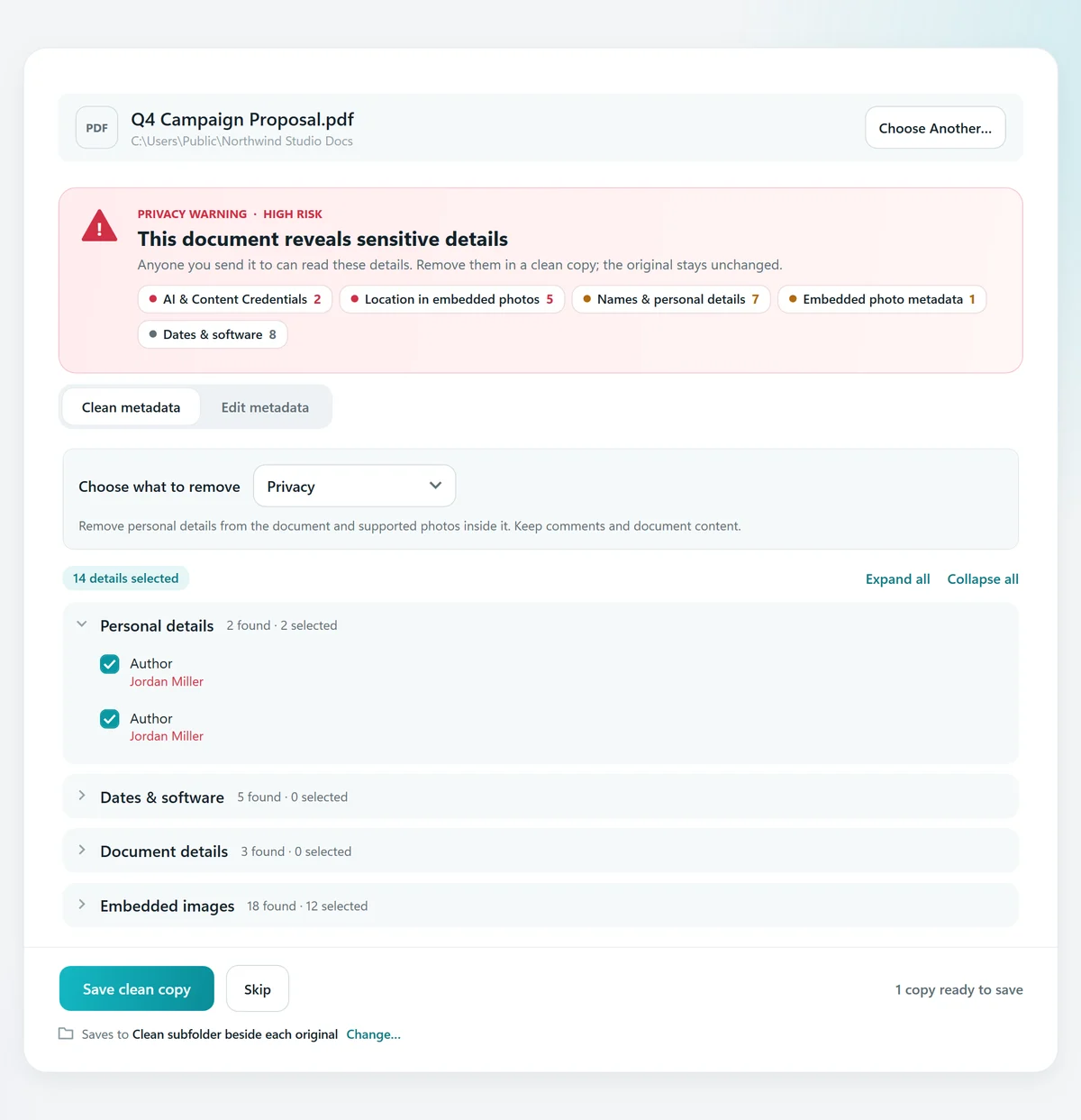
- Open the PDF in MetaClean on your Mac or Windows PC. A privacy warning lists everything it reveals.
- Choose what to remove, or switch to Edit metadata to change the title, author and dates instead.
- Save the clean copy. MetaClean checks it before saving; your original stays untouched.
Get MetaClean freeFree for 3 days · then $5 once · no subscription
What metadata a PDF reveals about you
PDF metadata is everything a PDF stores besides the pages you see. Word, Pages, InDesign, Acrobat and scanner apps fill it in automatically every time you export or save. Anyone who receives the file can read it in a few clicks, no PDF metadata viewer needed:
- Author and companySensitiveThe name on your account, and the company set up in Word or Acrobat.
- Creation softwareRevealingThe app and version that made it: Microsoft Word for Mac, InDesign, a scanner app.
- Created and modified datesRevealingWhen you wrote it and when you last changed it, to the second, with your time zone.
- Title, subject, keywordsRevealingOften left over from a template or an earlier client.
- Earlier versionsSensitiveEdits saved on top of the original can keep the old text and pages inside the file.
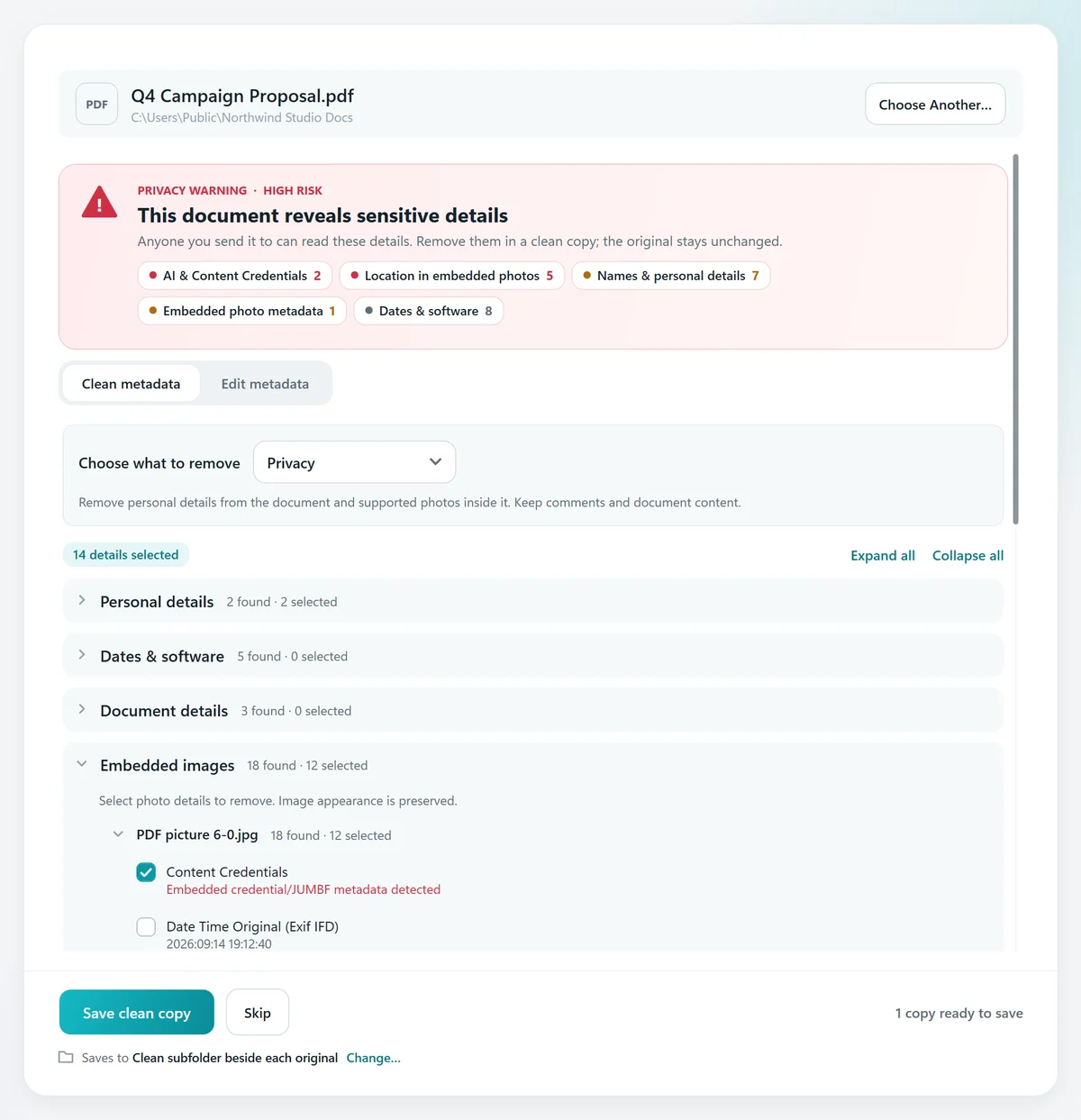
- Photos inside the PDFSensitiveEach image keeps its own EXIF: GPS location, camera, serial number, even Content Credentials.
- Comments and attachmentsRevealingReview notes, hidden files and layers that don’t show when you scroll.
The details are written twice: once in the document properties (the Info dictionary of the PDF standard, ISO 32000) and once in an XMP metadata block. Clearing the fields in a PDF reader’s properties window often leaves the XMP copy behind, and saving the change adds a new version on top of the old one instead of replacing it.
One PDF.Your name, your company,your location.
Photos placed in a PDF keep their GPS coordinates and camera serial number.How to remove metadata from a PDF
MetaClean works as a PDF metadata remover and viewer in one: you see every field before anything changes. It works the same on a Mac and on Windows 10 and 11, and takes a few seconds per file.
- 1
Open the PDF in MetaClean
Choose Documents › Single document and pick your PDF, or drop it on the window. Nothing is uploaded; the file is read on your computer.
- 2
Read the privacy warning
Every finding is listed in plain words and grouped: personal details, dates and software, document details and the photos embedded in the PDF.
- 3
Choose what to remove
The Privacy preset selects names, company and the location and camera details of embedded photos. Tick anything else you want gone, field by field.
- 4
Save the clean copy
MetaClean rewrites the PDF without the selected fields and without the earlier versions stored inside it, then saves the copy in a “Clean” folder beside your original.
Edit PDF metadata instead of removing it
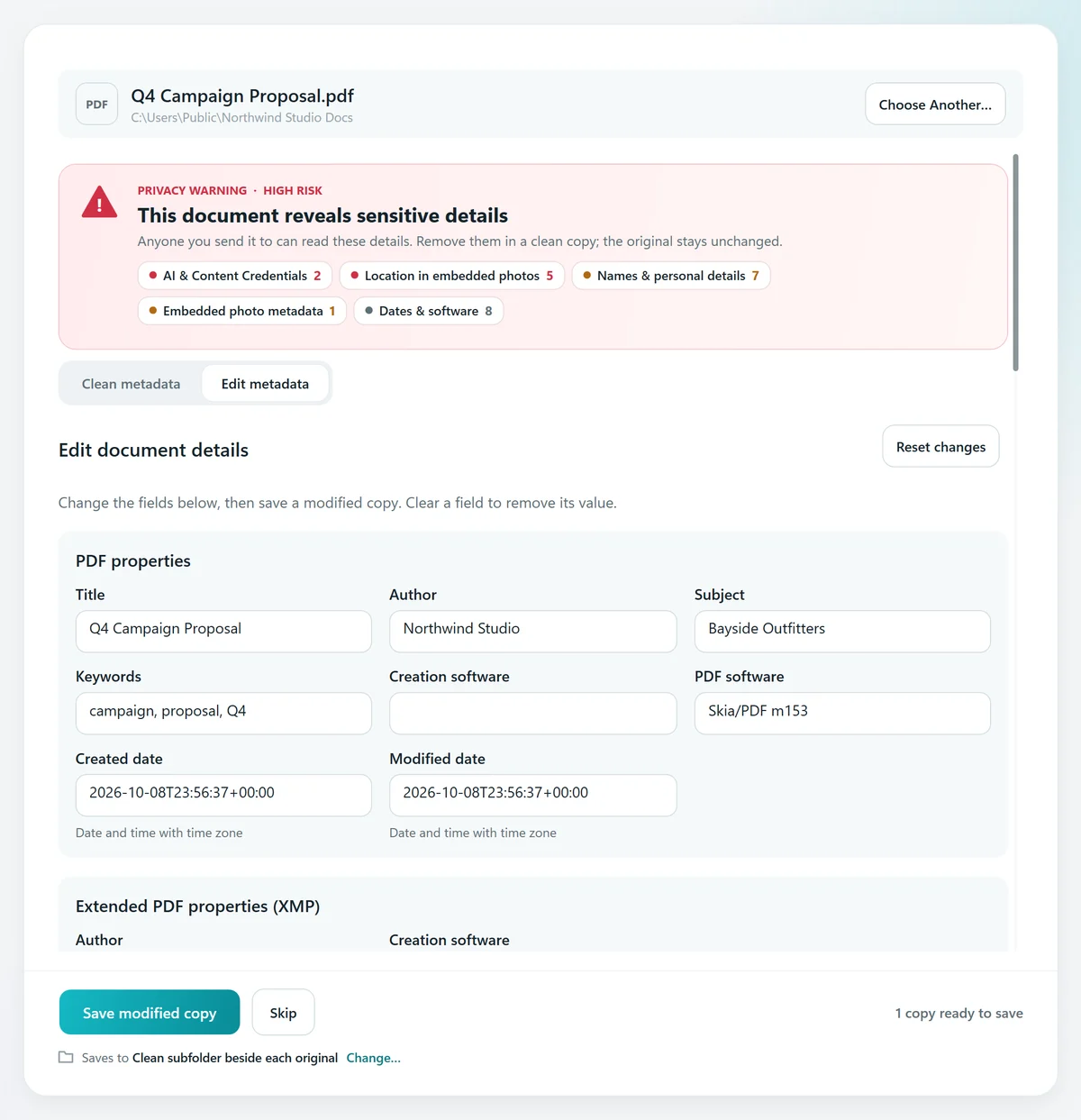
Sometimes you want the right details in the file, not none. Switch to Edit metadata to change the title, author, subject, keywords, creation software and dates, or clear a field to remove just that value. MetaClean updates the document properties and the XMP copy together, so Acrobat, Preview and every browser show the same thing. More ways to do it, with or without Acrobat, in how to change the author of a PDF.
Check the metadata is really gone
A remover that doesn’t check its own work can leave the XMP copy or an earlier version behind. MetaClean inspects the saved copy again, confirms every field you selected is gone and that the visible document is unchanged, and only then shows Clean copy verified with a list of what was removed.
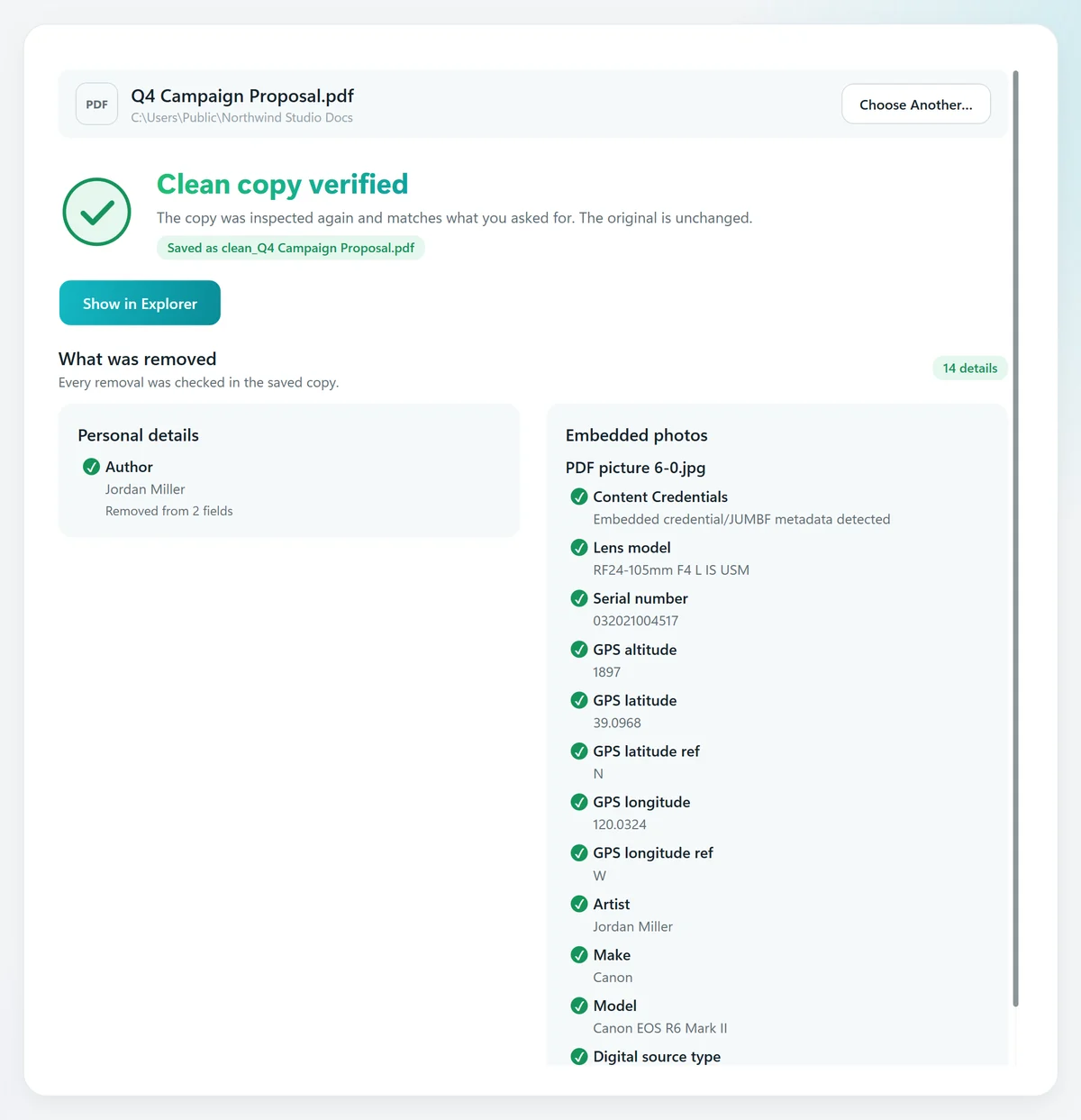
Photos are cleaned without being recompressed, so they look exactly the same. For photos and videos on their own, see the photo metadata remover and the free EXIF viewer; for AI labels on images, how to remove the AI label and the C2PA remover.
Every way to remove PDF metadata, compared
You’ll find four common ways to clean a PDF. Here’s what each one actually does:
Acrobat Pro’s Remove Hidden Information does a thorough job, as part of a monthly subscription. MetaClean does it once for $5, and cleans Word, Excel and PowerPoint files the same way, including on a Mac, where Office has no Document Inspector.
Remove metadata from many PDFs at once
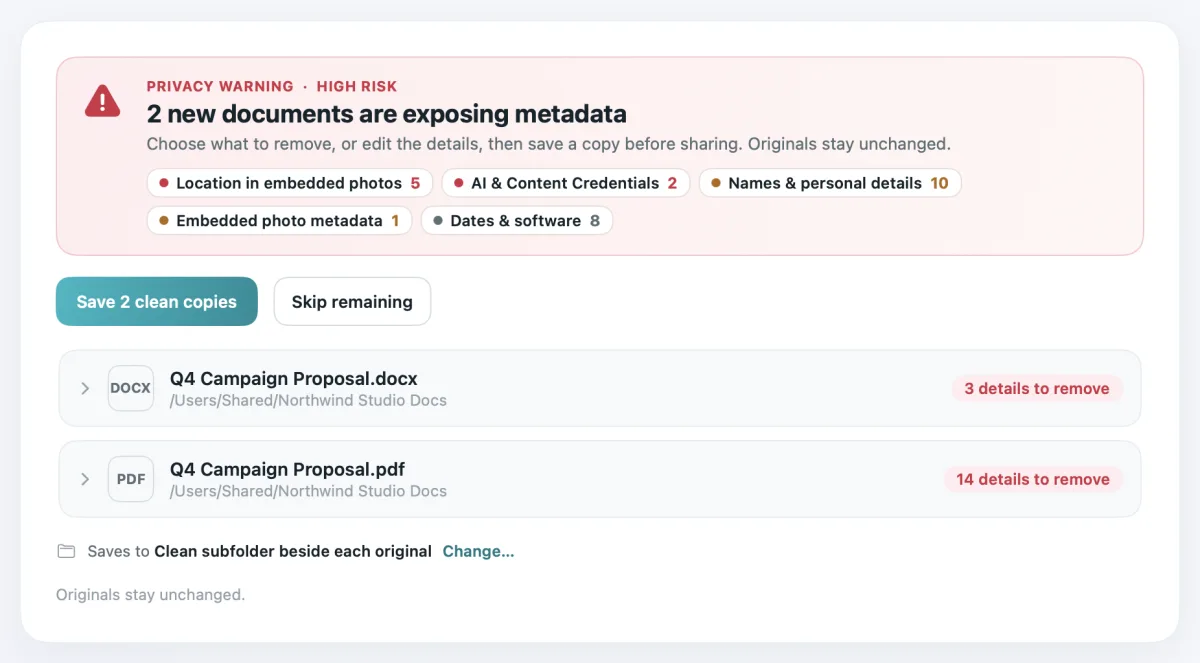
Sending a whole proposal pack or a folder of scans? Drop the folder into Documents › Batch folder: MetaClean cleans every PDF, Word, Excel, PowerPoint and OpenDocument file inside, subfolders included (see the guides for Word, Excel and PowerPoint). And with Watch Folders for documents, every new file saved into your folder is checked automatically, with a
Your documents stay on your computer
Contracts, CVs, invoices and client files shouldn’t go through someone else’s server just to remove a name. MetaClean works on your own Mac or Windows PC: no uploads, no account, no file size limits. More about privacy →
People are asking
What your PDF gives away
PDF metadata: your questions
How do I remove metadata from a PDF?
Open the PDF in MetaClean on your Mac or Windows PC, choose what to remove (the Privacy preset selects names, company and the location and camera details of photos inside the file) and save a clean copy. MetaClean rewrites the PDF without those fields and without the earlier versions stored inside it, reads the copy back to confirm they are gone, and keeps your original untouched.
What metadata does a PDF contain?
A PDF stores document properties (title, author, subject, keywords), the app that created it and the PDF software that wrote it, created and modified dates, the same details again in an XMP metadata block, earlier saved versions of the file, comments and attachments, and the full EXIF metadata of every photo placed inside it, including GPS location and camera serial number.
How do I edit PDF metadata?
In MetaClean, open the PDF and switch to Edit metadata. Change the title, author, subject, keywords, creation software or dates, or clear a field to remove its value, then save a modified copy. MetaClean updates both the document properties and the XMP copy, so every PDF viewer shows the same values.
How can I see the metadata in a PDF?
Drop the PDF into MetaClean: it lists every field it finds in plain words, grouped as personal details, dates and software, document details and embedded images, with a privacy warning for anything that identifies you. In Adobe Acrobat or Reader you can also open File › Properties, which shows the document properties but not the photo metadata inside the file.
Does “Print to PDF” remove metadata?
It creates a new file, but the printer driver writes its own author and software details, links and form fields are lost, the text can become harder to select, and the photos inside are
Will removing metadata change my PDF?
No. The pages, text, fonts, links and images stay exactly as they were. MetaClean removes only the fields you choose, rewrites the file without the earlier versions stored inside it, and checks that the visible document is unchanged before it saves the copy.
Is it safe to use an online PDF metadata remover?
Online tools need you to upload the document to their server first, which is the opposite of what you want for a contract, a CV or a client file. MetaClean cleans PDFs on your own computer: the file never leaves your Mac or PC.
How do I remove metadata from a PDF on a Mac?
Install MetaClean for Mac (macOS 14 or later), open the PDF and save a clean copy. It removes the author, company, software, dates, XMP copy, earlier versions and photo metadata in one pass, and works the same way on Windows 10 and 11.
Can I remove metadata from many PDFs at once?
Yes. Drop a whole folder into Batch folder and MetaClean cleans every PDF, Word, Excel, PowerPoint and OpenDocument file inside it, subfolders included. Watch Folders can also check every new document saved into a folder and offer to clean it.
Does MetaClean also clean Word, Excel and PowerPoint files?
Yes. The same Documents tools inspect and clean DOCX, XLSX and PPTX files (and older DOC, XLS and PPT), plus OpenDocument ODT, ODS and ODP: author, last saved by, company, manager, custom properties, comments and the photos inside them.

Send the document.
Keep your details.
Remove or edit PDF metadata on your own Mac or PC, with a verified clean copy every time. Free for 3 days, then $5 once.
Download free trial