
EXIF · GPS · camera · AI tags
Photo metadata remover for Mac and Windows
Every photo carries where and when it was taken, the camera and often its serial number. Drop one in to see what yours reveals, then remove metadata from photos in seconds, one at a time or a whole folder of photos and videos, without uploading anything.
Free for 3 days · then $5, once · Mac and Windows · Works offline, privacy policy
What is photo metadata, and what does it reveal?
Photo metadata is information stored inside the image file next to the picture. Most of it is EXIF data written by the camera the moment you take the shot; editing apps add IPTC and XMP fields, and newer AI tools add C2PA Content Credentials. You never see it in your gallery, but anyone who gets the original file can read it in seconds.
EXIF (Exchangeable Image File Format) data is the technical record a camera or phone writes into each photo: date and time, device make and model, lens, exposure settings and, if location is on, GPS coordinates. Removing metadata from a photo means saving a copy that contains only the image, so anyone who receives it sees the picture, but not where, when or with what it was taken.
IMG_4172.jpg says…
You shared a photo.It shared your address.
A photo taken at home carries your home’s coordinates, unless you remove them.See what your photo reveals before you clean it
Drop a photo into the viewer at the top of this page. It lists the GPS location, date taken, camera, lens, software and AI tags, read in your browser, so the photo never leaves your device.
Built into your system: on Windows, right-click the photo → Properties → Details. On a Mac, open it in Preview → Tools → Show Inspector. Both show the EXIF data; neither shows AI Content Credentials, which the viewer above does.
Want every field, down to exposure settings, edit history and video metadata? Open our free EXIF viewer.
How to remove metadata from a photo (strip EXIF data)
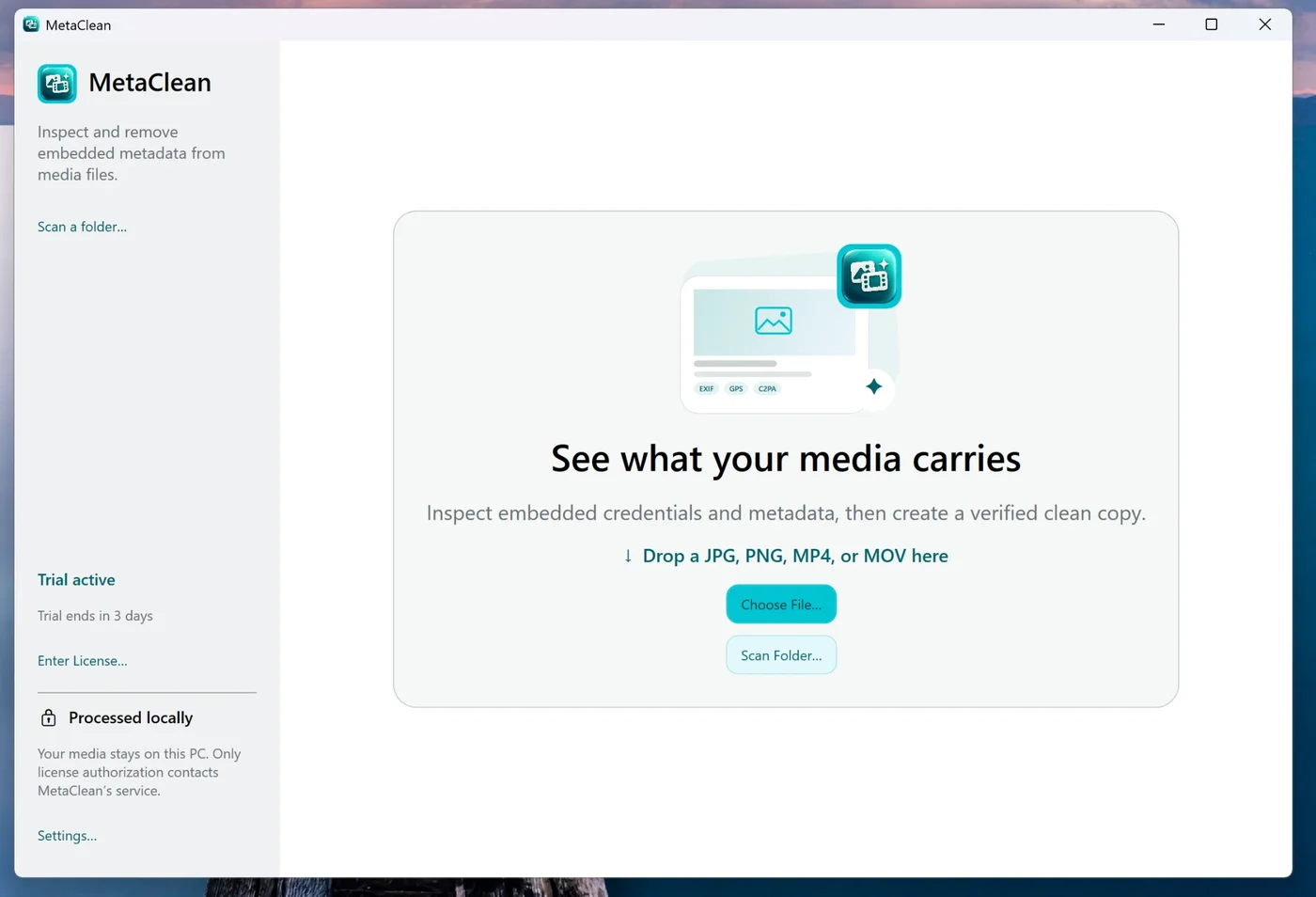
Use MetaClean as a photo EXIF data remover for a single picture or as a bulk metadata remover for a whole shoot. The steps are identical on Mac and Windows.
- 1
Drop in a photo, a video or a folder
JPG and PNG photos, MP4 and MOV clips, straight from your exports or your phone’s camera roll.
- 2
See every field in plain words
Location, date, camera, lens, serial, software, editing history and AI tags, listed before anything changes.
- 3
Pick a clean level
Privacy clean removes location, camera, dates, software and AI tags. All removable strips everything it can. Custom lets you keep, say, your copyright line.
- 4
Share the verified copy
MetaClean saves a
clean_copy after checking it, keeps the colour profile and orientation so it displays right, and never touches your original.
How to remove location from photos
GPS is the field most people want gone: phones add it to every photo once the camera has location access, which most people granted at setup. To remove location from a photo you’re about to share, clean it with Privacy clean. Want to keep the date and camera? Use Custom and remove the coordinates only.
Prefer to stop it at the source? On iPhone, go to Settings → Privacy & Security → Location Services → Camera and choose Never. On Android, open the Camera app’s settings and turn off Location tags (Samsung) or Save location (Pixel). New photos then carry no GPS, though existing ones still do.
Remove metadata from photos on Windows, Mac, iPhone and Android
Every system has a partial, built-in way. Here are the steps, then what each one actually removes.
On Windows
- Right-click the photo → Properties → Details.
- Click Remove Properties and Personal Information.
- Choose Create a copy with all possible properties removed.
On Mac
- Open the photo in Preview → Tools → Show Inspector.
- Open the GPS tab and click Remove Location Info.
- From the Photos app: File → Export, untick Location information.
On iPhone and iPad
- In Photos, swipe up on a photo → Adjust → No Location.
- Or when sharing, tap Options and switch Location off.
- For the full clean, AirDrop the photo to your Mac and drop it into MetaClean.
On Android
- Samsung Gallery: on the share screen, turn on Remove location data.
- Google Photos: Settings → Sharing → Remove geo location (for link shares).
- For the full clean, copy the photo to your computer and drop it into MetaClean.
| Where | Built-in option | What it removes |
|---|---|---|
| Windows | File Explorer → Properties → Details → Remove Properties and Personal Information | Many EXIF fields from the selected files |
| Mac | Preview: Remove Location Info · Photos: Export without Location information | Location only |
| iPhone | Photos → Adjust → No Location, or Share → Options → Location off | Location |
| Android | Samsung Gallery: Remove location data on share · Google Photos: Remove geo location (link shares) | Location only |
| MetaClean | Mac and Windows app | Location, camera, dates, serial, software, edit history and AI tags, for whole folders, verified |
Online EXIF removers vs MetaClean
Search “remove EXIF data online” and you’ll find plenty of upload tools. For a private photo, uploading it to strip its location is a strange trade:
| Online EXIF remover | MetaClean | |
|---|---|---|
| Your photo leaves your device | Most do | Never |
| A whole folder, subfolders included | Upload limits | Yes |
| Image re-encoded | Many rebuild it from pixels | Never, image data copied unchanged |
| AI tags and C2PA | Varies | Removed |
| Videos too | Rarely | MP4 and MOV |
Don’t Instagram and WhatsApp remove metadata anyway?
Partly. Instagram and Facebook strip much of the EXIF data when they recompress an upload. Meta also reads C2PA and IPTC signals to decide when to show its “AI info” label (Meta’s announcement), so those tags can change how your post appears.
With messaging apps, it depends how you send. A photo sent as a document or file arrives with its metadata intact. The reliable rule: clean the photo before it leaves your device. For the AI side, see how to remove AI metadata from a photo; for clips, the video metadata remover.
People are asking
Removing photo metadata
Photo metadata: your questions
How do I remove metadata from a photo?
Open the photo in MetaClean on your Mac or Windows PC, choose Privacy clean (location, camera, dates, software and AI tags) or All removable, and save. MetaClean writes a clean copy next to the original and checks it before saving.
What is photo metadata?
Photo metadata is information stored inside the image file alongside the picture: EXIF data from the camera (model, lens, settings, date and GPS location), IPTC and XMP fields with captions, copyright and edit history, and newer C2PA Content Credentials that can record AI edits.
How do I remove location from photos?
Clean the photo with MetaClean's Privacy clean and the GPS coordinates are removed from the copy you share. Built-in options exist too: Preview on a Mac has Remove Location Info, and the iPhone share sheet has a Location switch under Options. MetaClean removes location together with camera, dates, software and AI tags, for a whole folder in one pass.
Does removing EXIF data reduce photo quality?
No. MetaClean removes the metadata and copies the image data across unchanged, with no recompression, so the photo looks exactly the same. The colour profile and orientation are kept so it still displays correctly.
Can I strip EXIF data from many photos at once?
Yes. Point MetaClean at a folder and it cleans every photo in it, writing a verified clean copy of each. It works as a bulk metadata remover for whole shoots and exports.
Does Instagram or WhatsApp remove metadata?
Instagram and Facebook strip much of the EXIF data when they recompress an upload, and Meta reads C2PA and IPTC signals to decide on its AI label. With messaging apps it depends how you send: a photo sent as a document or file arrives with its metadata intact. Cleaning the photo before you share it is the only way to be sure.
Is there a free photo metadata remover?
Our free EXIF viewer and the checker on this page show what a photo reveals, without uploading it. MetaClean itself is free for 3 days, which is enough to clean a whole backlog, then $5 once. Unlike online tools it never uploads your photo, and unlike re-encoding tools it leaves the image untouched.
Does a screenshot remove metadata?
A screenshot drops the original's GPS and camera data, but it is a new, smaller image with its own date and device, and it can include parts of your screen you didn't mean to share. Cleaning the original keeps full quality and removes only the metadata.
What is EXIF data?
EXIF (Exchangeable Image File Format) data is the technical record a camera or phone writes into each photo: date and time, device make and model, lens, exposure settings and, if location is on, GPS coordinates. An EXIF remover deletes those fields from the file while leaving the picture unchanged.
Is there a free photo metadata viewer?
Yes, the viewer at the top of this page: drop a photo and it shows the location, date, camera, software and AI tags it carries. It runs in your browser, so the photo is never uploaded.
Is an online EXIF remover safe?
It depends on the site. Many upload your photo to their server, which means a private picture, often with its location, leaves your device. MetaClean works offline on your own computer.
Does it work on Mac and Windows?
Yes. MetaClean is a photo metadata remover for macOS 14 and later and Windows 11: free for 3 days, then $5 once, with free updates.

Share the photo.
Keep the details.
Remove location, camera details and AI tags from your photos on your own Mac or PC. Free for 3 days, then $5 once.
Download free trial